



Cyberattacks are no longer rare events. They happen every day to individuals, businesses, and even large organizations. The important thing to understand is this. Most cyberattacks follow a clear pattern. They are not random. If you understand that pattern, you can respond faster, reduce damage, and recover with confidence.
This guide explains exactly how attacks happen and what you should do at every stage. It follows the full lifecycle of an attack, from the first step an attacker takes to the final stage of recovery and protection. Cyberattacks don’t start with chaos. They follow a pattern. And so should your response.
Understanding the Cyberattack Lifecycle
Before you can stop an attack, you need to understand how it works. Attackers move step by step. Each stage helps them get closer to their goal.
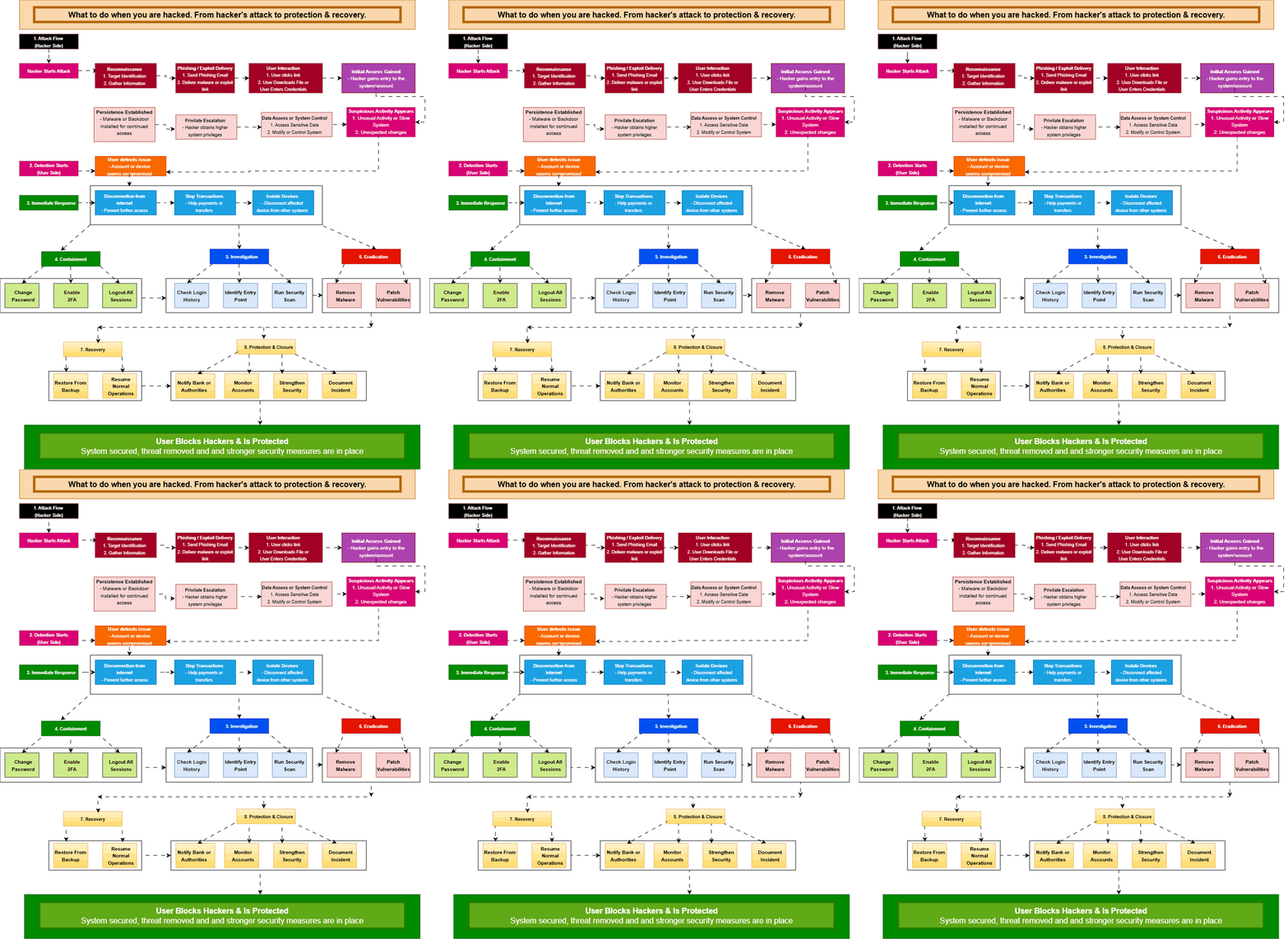
• 𝐑𝐞𝐜𝐨𝐧𝐧𝐚𝐢𝐬𝐬𝐚𝐧𝐜𝐞 → Attackers begin by gathering information about their target. They look for exposed systems, email addresses, login portals, and employee details. This helps them find weak points. Without this step, attacks are less effective
• 𝐏𝐡𝐢𝐬𝐡𝐢𝐧𝐠 / 𝐄𝐱𝐩𝐥𝐨𝐢𝐭 𝐃𝐞𝐥𝐢𝐯𝐞𝐫𝐲 → After identifying a target, attackers send malicious emails, links, or files. These are designed to look legitimate. In some cases, attackers exploit software vulnerabilities instead of targeting users directly
• 𝐔𝐬𝐞𝐫 𝐈𝐧𝐭𝐞𝐫𝐚𝐜𝐭𝐢𝐨𝐧 → A user clicks a link, downloads a file, or enters credentials. This action triggers the attack. Even strong systems can fail if a user is tricked
• 𝐈𝐧𝐢𝐭𝐢𝐚𝐥 𝐀𝐜𝐜𝐞𝐬𝐬 → The attacker gains entry into a system or account. At this stage, the environment is compromised, even if nothing seems wrong yet
• 𝐏𝐞𝐫𝐬𝐢𝐬𝐭𝐞𝐧𝐜𝐞 → Attackers install malware or create hidden access points. This ensures they can return later, even if the system is restarted or passwords are changed
• 𝐏𝐫𝐢𝐯𝐢𝐥𝐞𝐠𝐞 𝐄𝐬𝐜𝐚𝐥𝐚𝐭𝐢𝐨𝐧 → The attacker tries to gain higher level permissions. This allows deeper access and greater control across systems
• 𝐃𝐚𝐭𝐚 𝐀𝐜𝐜𝐞𝐬𝐬 / 𝐒𝐲𝐬𝐭𝐞𝐦 𝐂𝐨𝐧𝐭𝐫𝐨𝐥 → The attacker accesses sensitive data, modifies systems, or prepares for data theft or ransomware deployment. This is where major damage happens
• 𝐒𝐮𝐬𝐩𝐢𝐜𝐢𝐨𝐮𝐬 𝐀𝐜𝐭𝐢𝐯𝐢𝐭𝐲 → Unusual behavior appears. You may notice strange logins, system slowdowns, or unexpected changes. This is often the first visible warning
At this point, the attack becomes visible. Now your response begins.
Detection Recognizing the Signs of a Hack
Detection is the turning point in any cyber incident. The faster you detect the problem, the better your chances of limiting damage. Most users first notice something unusual. You might receive login alerts from unknown locations. You may see files missing or settings changed. Sometimes, systems become slow or behave unpredictably.
Organizations often rely on security tools like SIEM or endpoint detection systems. These tools flag unusual patterns such as abnormal network traffic or suspicious processes. However, detection is not only about tools. User awareness plays a critical role. If something feels wrong, it often is.
Immediate Response Act Without Delay
Once you suspect a breach, you must act quickly. Time is critical in this phase.
• 𝐔𝐬𝐞𝐫 𝐃𝐞𝐭𝐞𝐜𝐭𝐬 𝐈𝐬𝐬𝐮𝐞 → You notice something unusual such as login alerts, unknown devices, or unexpected activity. This is your first signal to act
• 𝐈𝐦𝐦𝐞𝐝𝐢𝐚𝐭𝐞 𝐑𝐞𝐬𝐩𝐨𝐧𝐬𝐞 → Disconnect your device from the internet immediately. This cuts off communication between the attacker and your system. Stop any financial transactions to prevent loss. Isolate the affected device to stop the spread
Quick action can stop the attack from getting worse. Delays give attackers more time to expand their access.
Containment Limiting the Damage
After the initial response, your goal is to contain the attack. This step focuses on reducing the attacker’s access.
• 𝐂𝐨𝐧𝐭𝐚𝐢𝐧𝐦𝐞𝐧𝐭 → Change all passwords for affected accounts. Use strong and unique passwords. Enable two factor authentication wherever possible. Log out of all active sessions
These actions remove the attacker’s current access and make it harder for them to return. Containment does not remove the threat completely, but it limits its impact.
Investigation Understanding What Happened
Now you need to understand how the attack occurred. This step is critical for preventing future incidents.
• 𝐈𝐧𝐯𝐞𝐬𝐭𝐢𝐠𝐚𝐭𝐢𝐨𝐧 → Check login history for unusual activity. Look for unknown locations, devices, or timestamps. Identify the entry point. It could be a phishing email, stolen credentials, or an unpatched vulnerability. Run a full security scan to detect malware or hidden access
This stage helps you uncover the root cause. Without it, the same attack can happen again.
Eradication Removing the Threat Completely
Once you know what happened, you can remove the threat.
• 𝐄𝐫𝐚𝐝𝐢𝐜𝐚𝐭𝐢𝐨𝐧 → Delete malware and unauthorized files. Remove unknown user accounts. Clean all affected systems. Patch any vulnerabilities that were exploited
This step must be thorough. Even a small leftover threat can allow the attacker to return.
Recovery Restoring Systems Safely
After removing the threat, you can begin recovery.
• 𝐑𝐞𝐜𝐨𝐯𝐞𝐫𝐲 → Restore systems and data from clean backups if needed. Make sure backups are safe before using them. Bring systems back online slowly and monitor them for unusual activity
Recovery should be controlled. Rushing this step can lead to reinfection.
Protection and Closure Building Long Term Security
The final stage focuses on preventing future attacks and closing the incident properly.
• 𝐏𝐫𝐨𝐭𝐞𝐜𝐭𝐢𝐨𝐧 & 𝐂𝐥𝐨𝐬𝐮𝐫𝐞 → Notify banks, service providers, or authorities if sensitive data was exposed. Monitor your accounts continuously. Strengthen your security practices by using strong passwords, enabling authentication, and updating systems regularly. Document the incident for future reference
This step turns a security incident into a learning opportunity.
Final Outcome From Attack to Resilience
A cyberattack does not have to be the end. With the right approach, you can recover and come back stronger. The goal is simple. Block the attacker, secure your system, and reduce the chances of future compromise.
Cybersecurity is not just about prevention. It is about detection, response, recovery, and resilience. When you understand the full lifecycle of an attack, you are no longer reacting blindly. You are responding with control and confidence.
FAQs
What should I do immediately after being hacked
You should disconnect the affected device from the internet, secure your accounts by changing passwords, and enable multi factor authentication as soon as possible.
How do I know if I have been hacked
Common signs include unusual login activity, unexpected account changes, unknown transactions, and alerts about new devices or locations.
Should I reset my device after a hack
If the compromise is serious or you cannot identify the source, a full system reset is often the safest option to remove hidden threats.
Can I prevent being hacked again
Yes, you can reduce risk by using strong passwords, enabling multi factor authentication, keeping software updated, and staying cautious with emails and links.