

Gurucul Named a Leader in the 2025 Gartner Magic Quadrant TM for SIEM 

Read the Report
Close Menu
Cybersecurity Threat & Artificial Intelligence

    Subscribe to Updates

    Get the latest creative news from FooBar about art, design and business.

    [sibwp_form id=1]
    What's Hot

    What to Do When You Are Hacked

    March 27, 2026

    Ransomware Campaign Targeting MFT Systems

    March 25, 2026

    Ivanti VPN Zero Day Exploitation: Active Threat, Impact, and Mitigation

    March 25, 2026
    X (Twitter) YouTube
    Cybersecurity Threat & Artificial IntelligenceCybersecurity Threat & Artificial Intelligence
    • Home
      • Cybersecurity Glossary
      • AI Glossary
      • Insider Threat Updates
      • Attack Matrix
    • Cybersecurity
      1. Cyber Threat Intelligence
      2. Hacking attacks
      3. Common Vulnerabilities & Exposures
      4. View All

      Ransomware Campaign Targeting MFT Systems

      March 25, 2026

      Ivanti VPN Zero Day Exploitation: Active Threat, Impact, and Mitigation

      March 25, 2026

      Cyber Warfare in Modern Conflicts: Nation-State Cyber Attacks and Defense Strategies

      March 6, 2026

      Iranian Cyber Attacks in the Last 10 Years (2016–2025): Timeline, Threat Groups, and Global Impact

      March 5, 2026

      What to Do When You Are Hacked

      March 27, 2026

      Iranian Hackers Targeting CCTV Networks During Military Operations (2026)

      March 20, 2026

      The Rise of the Handala Hacktivist Campaign

      March 18, 2026

      Cyber Warfare in Modern Conflicts: Nation-State Cyber Attacks and Defense Strategies

      March 6, 2026

      Top CVEs to Watch in July 2025: AI-Driven Threats and Exploits You Can’t Ignore

      July 8, 2025

      Security Policies Every Organization Must Have

      March 13, 2026

      Browser Extensions, Supply-Chain Vulnerabilities, and Early 2026 Threat Trends

      January 9, 2026

      AI Botnets: The Emerging Cybersecurity Threat Redefining Attack and Defense

      December 24, 2025

      Major Real-World Cyberattacks Where Kali Linux Tooling Played a Role

      December 19, 2025
    • AI
      1. AI‑Driven Threat Detection
      2. AI‑Powered Defensive Tools
      3. AI‑Threats & Ethics
      4. View All

      Emerging AI-Driven Threats and Defensive Shifts in 2026

      January 7, 2026

      Holiday Panic Rising: AI-Driven Mobile Fraud Is Wrecking Consumer Trust This Shopping Season

      December 5, 2025

      How Artificial Intelligence Identifies Zero-Day Exploits in Real Time | Cybersecurity Threat AI Magazine

      June 28, 2025

      Emerging AI-Driven Threats and Defensive Shifts in 2026

      January 7, 2026

      Gurucul Unveils AI-SOC Analyst: Deep Collaboration Meets Autonomous Security Operations

      August 7, 2025

      ChatGPT Style Assistants for Security Operations Center Analysts | Cybersecurity Threat AI Magazine

      June 28, 2025

      Emerging AI-Driven Threats and Defensive Shifts in 2026

      January 7, 2026

      Holiday Panic Rising: AI-Driven Mobile Fraud Is Wrecking Consumer Trust This Shopping Season

      December 5, 2025

      Deepfake Identity Fraud: Artificial Intelligence’s Role and Defenses | Cybersecurity Threat AI Magazine

      June 28, 2025

      Narrative Warfare: How India Is Being Targeted, How Pakistan Operates It, and What India Must Do to Fight Back

      November 26, 2025

      Cyber Wars, Cyber Threats, and Cybersecurity Will Push Gold Higher

      October 20, 2025

      The Surge in AI Deepfake Enabled Social Engineering

      September 10, 2025

      Perplexity’s Comet Browser: Next-Gen AI-Powered Threat Protection for Secure Web Experiences

      July 25, 2025
    • News
      1. Tech
      2. Gadgets
      3. View All

      Security Policies Every Organization Must Have

      March 13, 2026

      Browser Extensions, Supply-Chain Vulnerabilities, and Early 2026 Threat Trends

      January 9, 2026

      AI Botnets: The Emerging Cybersecurity Threat Redefining Attack and Defense

      December 24, 2025

      Major Real-World Cyberattacks Where Kali Linux Tooling Played a Role

      December 19, 2025

      Ransomware Campaign Targeting MFT Systems

      March 25, 2026

      Ivanti VPN Zero Day Exploitation: Active Threat, Impact, and Mitigation

      March 25, 2026

      AI Is Emerging as the New Insider: Key Takeaways from the Gurucul 2026 Insider Risk Report

      March 18, 2026

      EU Proposes a Major Cybersecurity Certification Overhaul: What Is Really Changing and Why It Matters

      January 30, 2026
    • Marketing
      1. Cybersecurity Marketing
      2. AI Business Marketing
      3. Case Studies
      4. View All

      Cybersecurity Marketing Strategy for Enterprise Growth

      February 17, 2026

      Cybersecurity Account Based Marketing Services

      December 22, 2025

      Cybersecurity Content Marketing Services

      December 22, 2025

      Cybersecurity Digital Marketing Services

      December 22, 2025

      Cybersecurity Marketing Strategy for Enterprise Growth

      February 17, 2026

      How a Cybersecurity SaaS Grew From 0 to 100 Enterprise Clients in 12 Months

      December 3, 2025

      Why Most AI Startups Fail at Marketing

      June 29, 2025

      What to Do When You Are Hacked

      March 27, 2026

      Ransomware Campaign Targeting MFT Systems

      March 25, 2026

      Ivanti VPN Zero Day Exploitation: Active Threat, Impact, and Mitigation

      March 25, 2026

      Iranian Hackers Targeting CCTV Networks During Military Operations (2026)

      March 20, 2026

      Cybersecurity Marketing Strategy for Enterprise Growth

      February 17, 2026

      Cybersecurity Account Based Marketing Services

      December 22, 2025

      Cybersecurity Content Marketing Services

      December 22, 2025

      Cybersecurity Digital Marketing Services

      December 22, 2025
    • Cybersecurity Products
      • SIEM
      • SOC
    • Contact
    X (Twitter) YouTube LinkedIn
    Cybersecurity Threat & Artificial Intelligence
    Home » What to Do When You Are Hacked
    Editor's Choice

    What to Do When You Are Hacked

    cyber security threatBy cyber security threatMarch 27, 2026No Comments7 Mins Read
    Facebook Twitter Pinterest Telegram LinkedIn Tumblr WhatsApp Email
    What to Do When You Are Hacked: Step by Step Guide
    What to Do When You Are Hacked: Step by Step Guide
    Share
    Facebook Twitter LinkedIn Pinterest Telegram Email

    Understanding what to do when you are hacked is critical in today’s threat landscape. Cyber attacks are no longer rare events. They are frequent, automated, and often difficult to detect. Many victims only realize something is wrong after unauthorized transactions, account lockouts, or suspicious activity appear. At that point, attackers may already have access to sensitive data or systems. Therefore, a clear and structured response is essential. Acting quickly can contain the threat, reduce damage, and help you regain control before the situation escalates.

    What Is a Cybersecurity Hack

    A cybersecurity hack occurs when an attacker gains unauthorized access to a system, account, or network. This access often comes through stolen credentials, phishing emails, weak passwords, or unpatched vulnerabilities. In many cases, attackers do not act immediately. Instead, they quietly observe activity and expand their access over time. As a result, the impact of a hack can grow significantly if it is not addressed quickly.

    Why It Is Critical to Act Immediately

    When a breach occurs, time becomes your most valuable resource. Attackers often move fast to secure their access and avoid detection. They may attempt to change passwords, disable security controls, or extract sensitive information. Therefore, knowing what to do when you are hacked allows you to interrupt their activity early. In addition, a fast response reduces financial loss, protects personal or business data, and limits long term damage.

    Step 1: Contain the Threat Immediately

    The first step is to stop the attacker from continuing their activity. You should disconnect the affected device from the internet as soon as possible. This action prevents further communication between the compromised system and external attacker infrastructure. At the same time, log out of all active sessions across your accounts. If possible, force a logout from all devices. If the incident affects a workplace system, you should report it to the security or IT team immediately. Quick containment is essential because it limits the attacker’s ability to expand access.

    Step 2: Secure Your Accounts and Credentials

    Once the threat is contained, you need to regain control of your accounts. Use a clean and trusted device to change all important passwords. Start with your primary email account because it is often used to reset other accounts. Then update passwords for banking services, cloud platforms, and social media. Make sure each password is strong and unique. In addition, enable multi factor authentication on all critical accounts. This adds an extra layer of protection even if credentials are exposed again.

    Step 3: Identify What Has Been Compromised

    After securing access, you should assess the scope of the incident. Check for unusual login activity, unknown devices, or changes in account settings. Review recent transactions, sent emails, and file access logs if available. This step helps you understand what the attacker accessed and what data may have been exposed. Therefore, it is important for determining the overall impact of the breach.

    Step 4: Scan and Clean the Affected System

    Next, you need to remove any malicious presence from the system. Run a full security scan using a trusted antivirus or endpoint detection tool. Look for unknown applications, suspicious processes, or unauthorized browser extensions. In addition, update your operating system and all installed software to patch any vulnerabilities. If the compromise appears severe, a full system reset may be the safest option. This ensures that any hidden persistence mechanisms are removed completely.

    Step 5: Protect Financial and Sensitive Data

    If there is any chance that financial or personal data was exposed, you should act immediately. Contact your bank or financial provider and inform them of the situation. Monitor your accounts for unusual activity and enable transaction alerts. In some cases, you may need to temporarily freeze your accounts or cards. This step reduces the risk of fraud and helps prevent further financial loss.

    Step 6: Monitor for Ongoing Suspicious Activity

    Even after initial recovery, you should continue monitoring for signs of compromise. Watch for unusual login attempts, unexpected notifications, or new devices accessing your accounts. In addition, review system logs and alerts if available. Attackers sometimes attempt to regain access after being removed. Therefore, ongoing monitoring is essential to ensure the threat has been fully eliminated.

    Step 7: Understand How the Attack Happened

    It is important to identify the root cause of the breach. This could be a phishing email, a reused password, or an unpatched vulnerability. Understanding how the attacker gained access helps prevent the same issue from happening again. For example, if phishing was involved, you should review email security practices. If credentials were reused, you should implement stronger password management. This step turns the incident into a learning opportunity and strengthens your overall security posture.

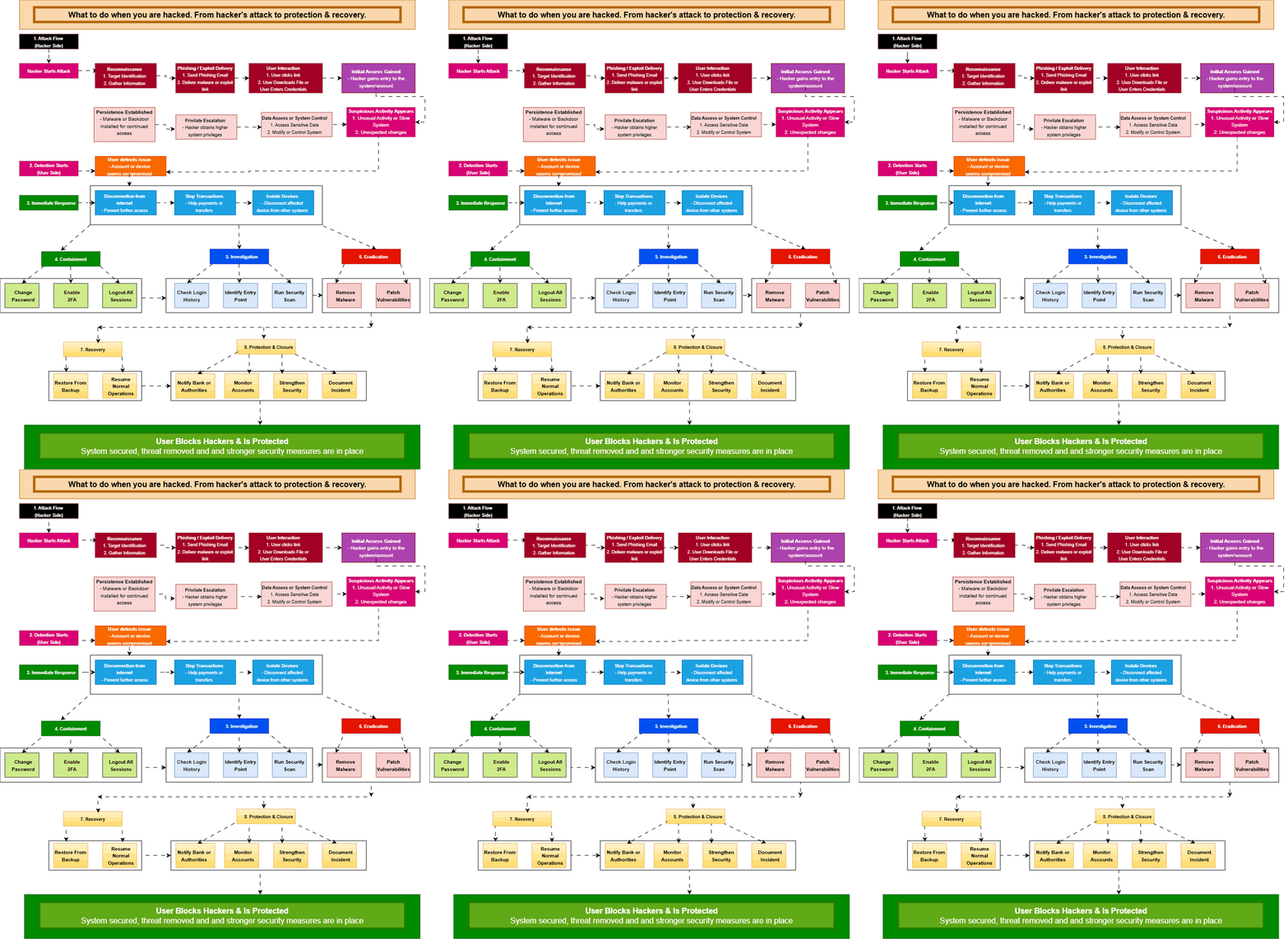
    Incident Response Flow When You Are Hacked

    Contain the device → Secure accounts and reset passwords → Identify compromised data → Scan and clean the system → Protect financial accounts → Monitor for suspicious activity → Analyze root cause and strengthen security

    Detection Challenges

    One of the biggest challenges in cybersecurity is detecting a compromise early. Attackers often use legitimate credentials, which makes their activity appear normal. In addition, encrypted communication hides malicious traffic from basic monitoring tools. As a result, many breaches go unnoticed until damage is already done. This highlights the importance of proactive monitoring and user awareness.

    Why Traditional Defenses Fail

    Traditional security tools often rely on known threat patterns. However, modern attackers constantly change their techniques to avoid detection. They use living off the land methods, legitimate tools, and stolen credentials to bypass defenses. Therefore, relying only on basic antivirus or firewall protection is no longer sufficient. Organizations and individuals must adopt a layered security approach that includes monitoring, detection, and response capabilities.

    Mitigation Strategies

    Preventing future incidents requires a combination of technical controls and user awareness. Always keep systems and applications updated to reduce exposure to known vulnerabilities. Use strong and unique passwords for every account. Enable multi factor authentication wherever possible. In addition, be cautious when opening emails or clicking links, especially from unknown sources. Regular security awareness and good digital hygiene significantly reduce the risk of compromise.

    Broader Security Implications

    A single compromised account can lead to wider security issues. For individuals, it may result in identity theft or financial loss. For organizations, it can lead to data breaches, regulatory penalties, and reputational damage. Therefore, understanding what to do when you are hacked is not just about recovery. It is about protecting long term security and trust.

    What Organizations Should Do Now

    Organizations should treat every incident as a learning opportunity. They should implement incident response plans and conduct regular security assessments. In addition, deploying endpoint detection and response tools improves visibility into threats. Employee training is equally important because human error remains a major entry point for attackers. A proactive approach helps reduce risk and improves resilience against future attacks.

    Conclusion

    Knowing what to do when you are hacked allows you to respond quickly, limit damage, and regain control. Cyber incidents can happen to anyone, but the outcome depends on how effectively you respond. By following a structured approach that includes containment, recovery, and prevention, you can significantly reduce the impact of a breach. In addition, continuous monitoring and improved security practices help ensure that future attacks are less likely to succeed.

    FAQs

    What should I do immediately after being hacked
    You should disconnect the affected device from the internet, secure your accounts by changing passwords, and enable multi factor authentication as soon as possible.

    How do I know if I have been hacked
    Common signs include unusual login activity, unexpected account changes, unknown transactions, and alerts about new devices or locations.

    Should I reset my device after a hack
    If the compromise is serious or you cannot identify the source, a full system reset is often the safest option to remove hidden threats.

    Can I prevent being hacked again
    Yes, you can reduce risk by using strong passwords, enabling multi factor authentication, keeping software updated, and staying cautious with emails and links.

    Share. Facebook Twitter Pinterest LinkedIn Tumblr Email
    cyber security threat
    • Website

    Related Posts

    Ransomware Campaign Targeting MFT Systems

    March 25, 2026

    Ivanti VPN Zero Day Exploitation: Active Threat, Impact, and Mitigation

    March 25, 2026

    Iranian Hackers Targeting CCTV Networks During Military Operations (2026)

    March 20, 2026

    AI Is Emerging as the New Insider: Key Takeaways from the Gurucul 2026 Insider Risk Report

    March 18, 2026

    The Rise of the Handala Hacktivist Campaign

    March 18, 2026

    Security Policies Every Organization Must Have

    March 13, 2026
    Leave A Reply Cancel Reply

    Top Picks
    Editors Picks

    What to Do When You Are Hacked

    March 27, 2026

    Ransomware Campaign Targeting MFT Systems

    March 25, 2026

    Ivanti VPN Zero Day Exploitation: Active Threat, Impact, and Mitigation

    March 25, 2026

    Iranian Hackers Targeting CCTV Networks During Military Operations (2026)

    March 20, 2026
    Advertisement
    Demo
    About Us
    About Us

    Artificial Intelligence & AI, The Pulse of Cybersecurity Powered by AI.

    We're accepting new partnerships right now.

    Email Us: info@cybersecuritythreatai.com

    Our Picks

    Cybersecurity Marketing Strategy for Enterprise Growth

    February 17, 2026

    Cybersecurity Account Based Marketing Services

    December 22, 2025

    Cybersecurity Content Marketing Services

    December 22, 2025
    Top Reviews
    X (Twitter) YouTube LinkedIn
    • Home
    • AI Business Marketing Support
    • Cybersecurity Marketing Support
    © 2026 Cybersecurity threat & AI Designed by Cybersecurity threat & AI .

    Type above and press Enter to search. Press Esc to cancel.

    Grow your AI & Cybersecurity Business.
    Powered by Joinchat
    HiHello , welcome to cybersecuritythreatai.com, we bring reliable marketing support for ai and cybersecurity businesses.
    Can we help you?
    Open Chat