



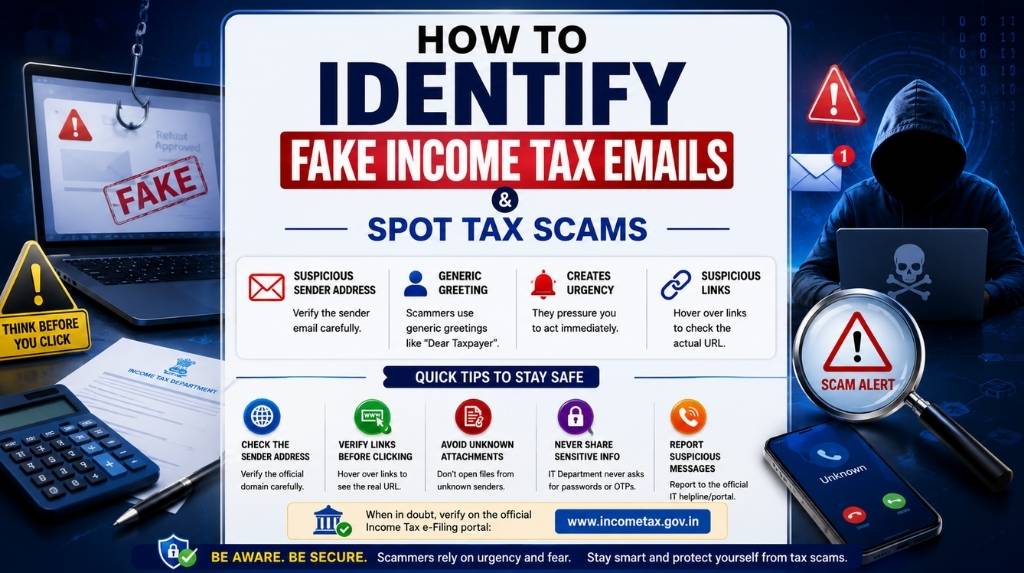
Don’t Let a Tax Refund Become a Costly Mistake
Imagine opening your inbox on a busy Monday morning and seeing an email with the subject:
“Your Income Tax Refund Has Been Approved.”
How Threat Emails and other contents looks:
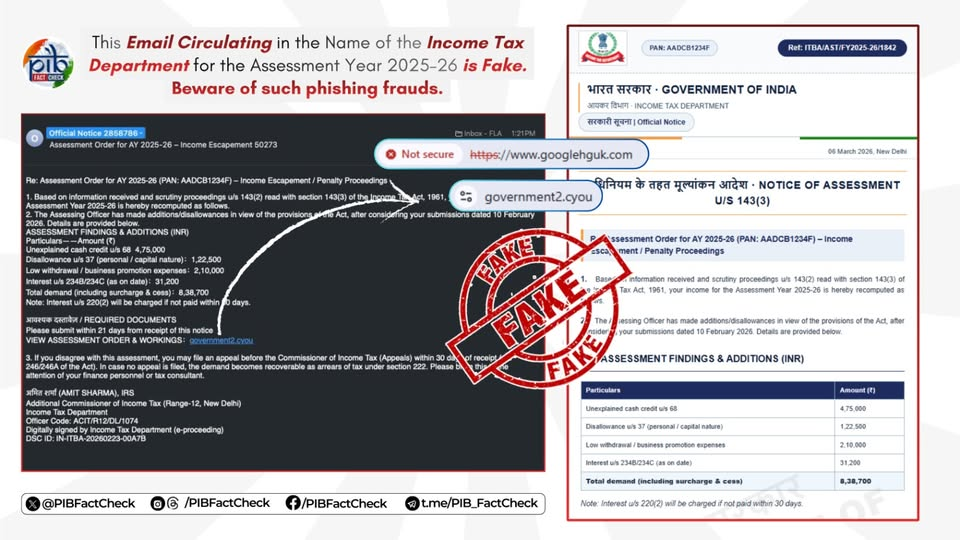
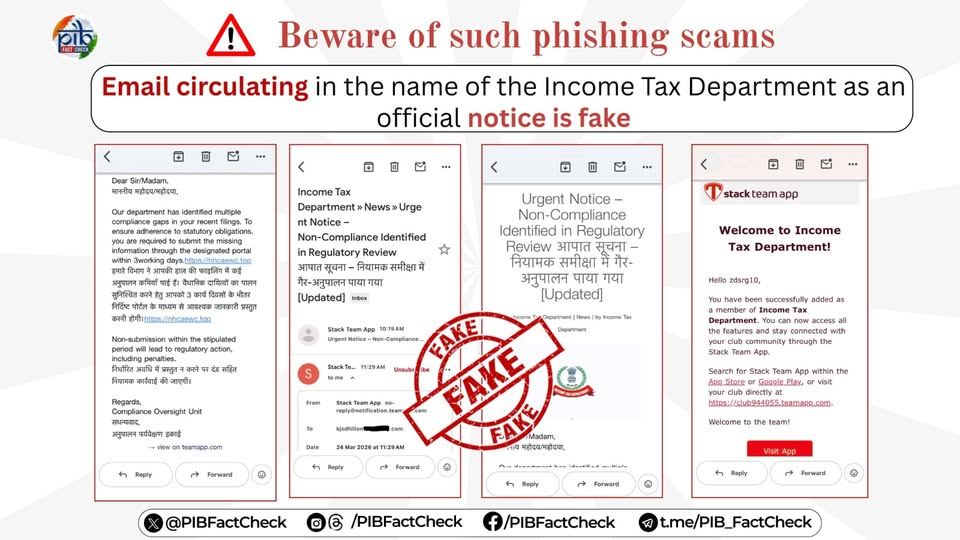
The initial attack vector in this campaign is a spear-phishing email spoofed to appear as an official communication from the Income Tax Department.
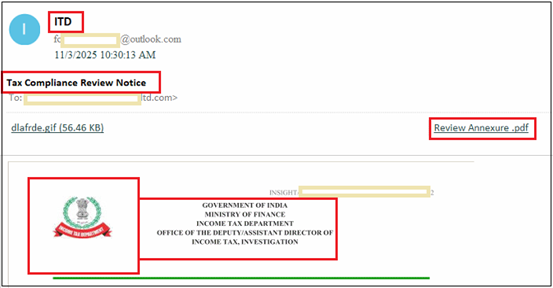
What makes this email particularly noteworthy is that the body contains no text at all. Instead, it features a single embedded image crafted to resemble an authentic ITD notice.
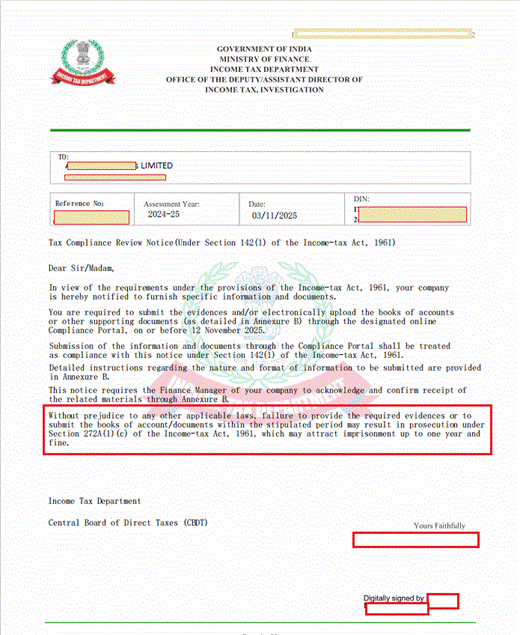
Opening the attached PDF revealed something far more interesting than a simple tax notice. Instead of providing any legitimate compliance details, the document contained a follow-up instruction labeled “Annexure A”, which attempted to reinforce the urgency of the earlier email.
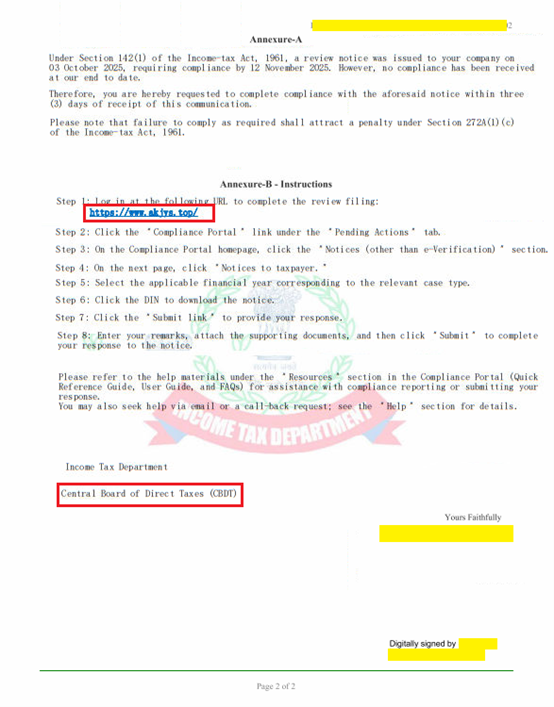
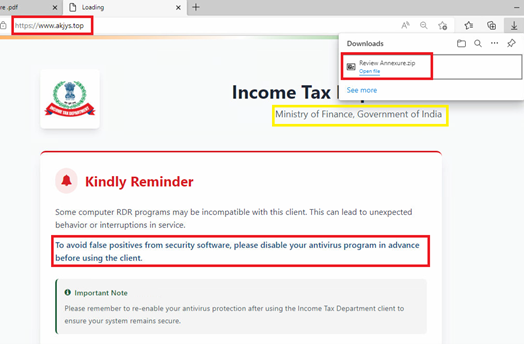
Fake ITD Compliance Portal and Malware Auto-download Trigger
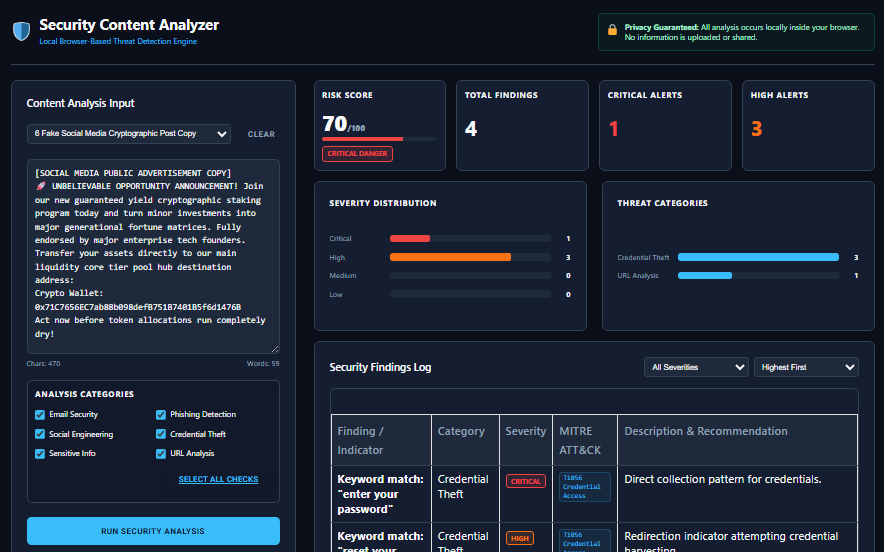
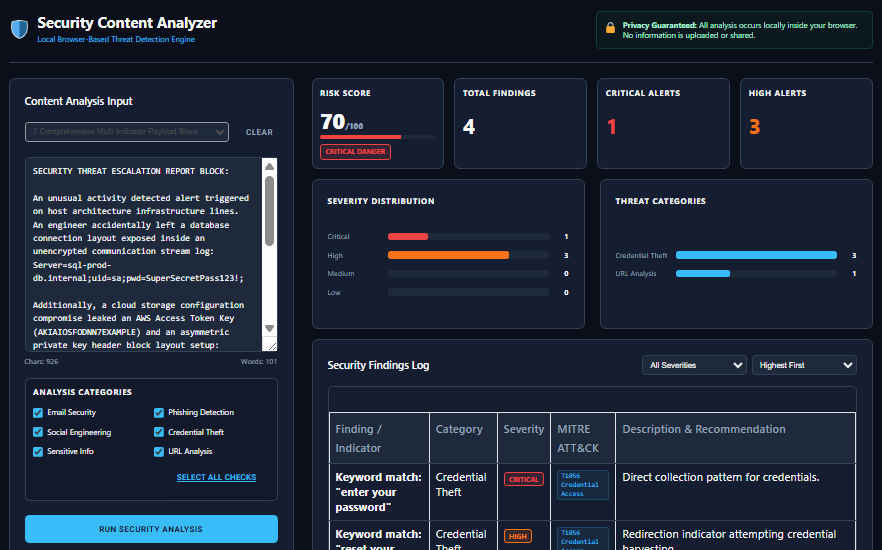
How Our Free Security Content Analyzer Can Help Detect Fake Income Tax Return Email:
Access Free Security Content Analyzer
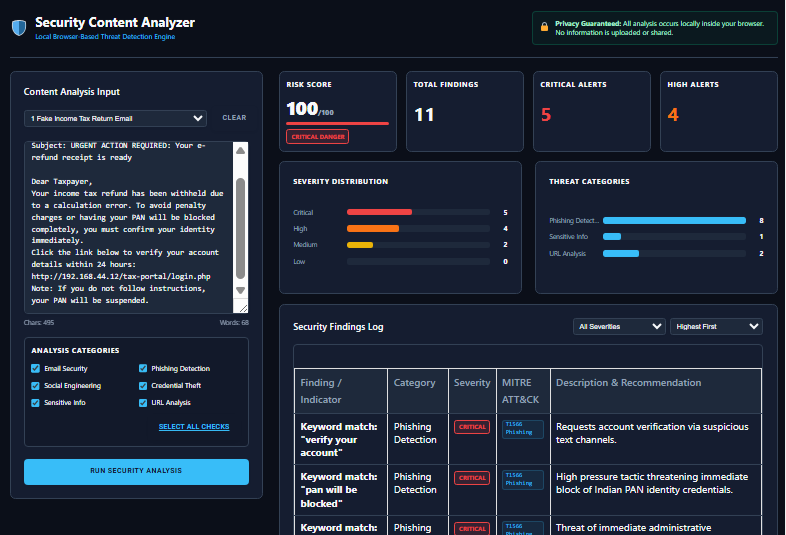
Detect Fake Banking Alert Message:
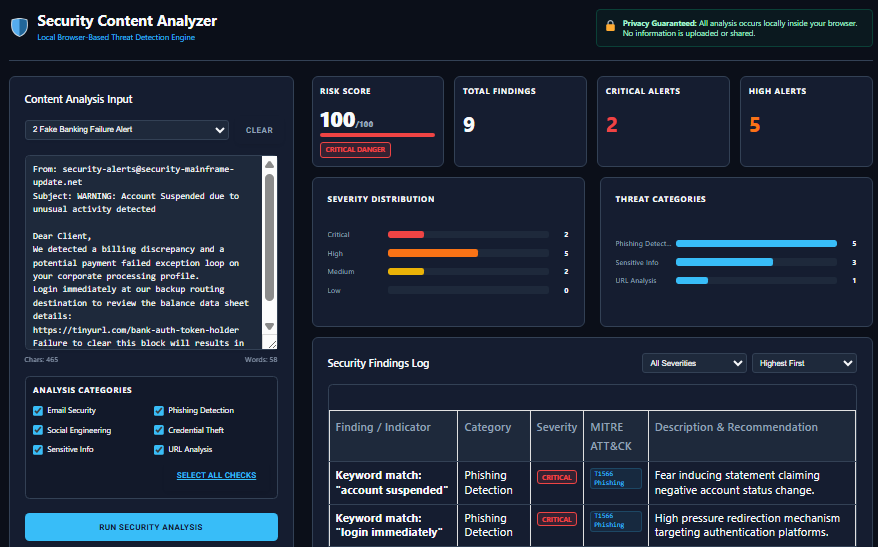
Detect WhatsApp Lottery Scam Message:
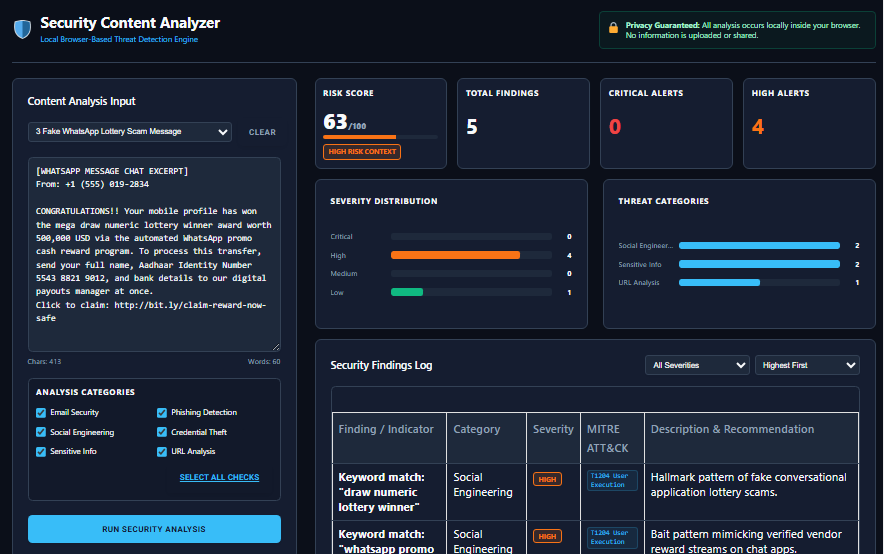
Detect SMS Package Delivery Message:
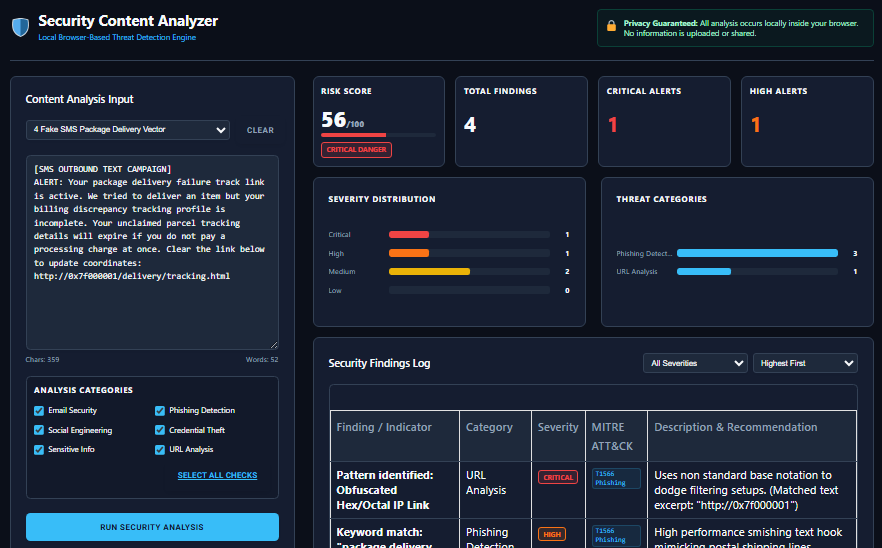
Fake Social Media Direct Compromise Message:
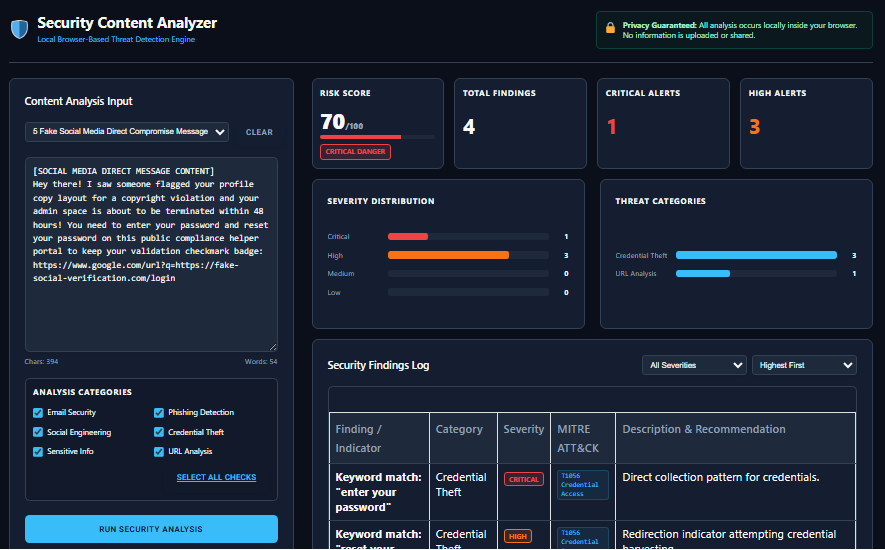
Fake Social Media Cryptography Post Copy:
Comprehensive Multi Indicator Payload:
It looks convincing.
The email carries what appears to be the Income Tax Department’s logo. It mentions your PAN number, includes a refund amount that seems realistic, and politely asks you to verify your bank account so the refund can be credited.
If you’ve recently filed your Income Tax Return (ITR), nothing about the message feels unusual.
Now imagine clicking the link, entering your banking details, and only later realizing the website wasn’t genuine. Instead of receiving a refund, you’ve unknowingly handed your personal and financial information to cybercriminals.
Unfortunately, this isn’t a rare occurrence.
Every tax season, fraudsters launch large-scale phishing campaigns targeting individuals, salaried employees, business owners, freelancers, and even tax professionals. Their goal isn’t just to trick people into clicking a malicious link, they want to steal credentials, banking information, one-time passwords (OTPs), and personal identity data that can later be used for financial fraud or identity theft.
What’s even more concerning is that today’s phishing attacks look nothing like the poorly written scam emails of a decade ago.
Modern phishing emails are professionally designed, grammatically correct, personalized, and increasingly generated using artificial intelligence. They often imitate official government communications so convincingly that even experienced internet users can struggle to tell the difference.
And emails are only one part of the problem.
The same scam may begin with an email, continue through WhatsApp, and end with a fake phone call. Others arrive as SMS messages containing shortened links, QR codes, or urgent requests to verify your PAN or Aadhaar details. Some appear through Facebook Messenger, Instagram Direct Messages, Telegram, or LinkedIn, making the attack feel even more personal.
In other words, phishing is no longer an email problem, it’s a communication problem.
That’s why awareness alone isn’t always enough.
Instead of relying solely on instinct or trying to remember dozens of phishing warning signs, it’s often safer to have suspicious messages analyzed before you interact with them.
Our Threat Content Detection Engine is designed specifically for this purpose. Whether you receive a suspicious email, SMS, WhatsApp message, Telegram chat, or social media message, the tool analyzes its content for phishing indicators, impersonation attempts, social engineering tactics, suspicious language, and other signs commonly associated with online scams.
Rather than asking yourself, “Does this message look genuine?”, you can let AI evaluate it before you click a link, open an attachment, scan a QR code, or share sensitive information.
In this guide, you’ll learn how to recognize fake Income Tax emails, understand the psychology behind tax-related phishing attacks, identify common scam patterns across different communication platforms, and discover how AI-powered content analysis can help you make safer decisions online.
Why Tax Season Is a Gold Mine for Cybercriminals
Most phishing attacks succeed because attackers understand human behavior.
Tax season is one of the few times each year when millions of people actively expect communication from government departments, banks, employers, and financial institutions.
People routinely receive:
- Income Tax refund notifications
- PAN verification requests
- Income Tax Return acknowledgments
- Tax demand notices
- AIS and TIS updates
- Refund processing alerts
- Bank account verification requests
- Tax payment reminders
- Notices related to outstanding dues
Because these communications are expected, people naturally become less suspicious.
Cybercriminals take advantage of this expectation.
Instead of sending random scam emails, they craft messages that blend into normal tax-related communication. A fake email promising a refund of ₹12,860 or warning about a pending tax demand appears believable because it reflects situations many taxpayers genuinely experience.
Timing also plays an important role.
Attackers often launch phishing campaigns close to important filing deadlines, refund processing periods, or government announcements. During these busy periods, people are more likely to skim messages quickly, click links without verifying them, or respond immediately because they don’t want to miss a deadline or delay a refund.
This combination of urgency, familiarity, and financial motivation makes tax-related phishing one of the most successful forms of online fraud.
Why Even Smart People Fall for Income Tax Phishing Scams
One of the biggest myths about phishing is that only inexperienced internet users become victims.
In reality, cybersecurity professionals, accountants, finance managers, entrepreneurs, lawyers, and software engineers have all reported receiving phishing emails that looked convincing enough to make them pause.
Why?
Because phishing isn’t really about technology.
It’s about psychology.
Attackers study how people react under pressure.
They know that words like “Final Notice,” “Immediate Action Required,” “Refund Pending,” and “Legal Compliance” trigger emotional responses.
Instead of trying to hack your computer directly, they try to influence your decisions.
Most successful phishing attacks exploit emotions such as:
Fear
Messages warn about penalties, account suspension, legal action, or rejected tax filings to pressure recipients into acting quickly.
Urgency
Attackers create artificial deadlines by claiming your refund will expire in a few hours or that your PAN will be blocked unless you verify your information immediately.
Curiosity
Unexpected refund notifications or tax benefits encourage people to click simply to find out more.
Trust
Government logos, official terminology, professional formatting, and realistic email signatures make fraudulent messages appear authentic.
Financial Motivation
Promises of tax refunds, rebates, incentives, or bonus tax credits often override caution because people don’t want to lose money they’re expecting.
Understanding these psychological tactics is just as important as identifying suspicious links. Many phishing campaigns succeed not because the technology is advanced, but because the message creates enough emotional pressure to bypass rational thinking.
Phishing Isn’t Limited to Email Anymore
When people hear the word “phishing,” they usually imagine a suspicious email sitting in their inbox.
Unfortunately, cybercriminals have expanded far beyond email.
Today’s tax scams commonly appear through:
- SMS (Smishing)
- Telegram
- Facebook Messenger
- Instagram Direct Messages
- LinkedIn Messages
- Fake websites
- QR codes
- PDF attachments
- Google Forms
- Online advertisements
- Fake customer support chats
In many cases, attackers combine multiple channels.
For example, you might first receive an email informing you about a tax refund. Shortly afterward, you receive a WhatsApp message claiming to be from the Income Tax Department reminding you to complete verification. If you still don’t respond, you might receive an SMS containing another shortened link or QR code.
Each communication reinforces the previous one, making the scam appear increasingly legitimate.
This multi-channel approach makes manual verification much harder because each message may seem harmless on its own while collectively forming a coordinated phishing campaign.
Why Traditional Phishing Advice Is No Longer Enough
For years, cybersecurity awareness campaigns advised people to watch for spelling mistakes, poor grammar, or suspicious-looking email addresses.
Those warning signs are still useful—but they’re no longer enough.
Today’s attackers use AI writing tools to produce fluent, grammatically correct messages. They copy official government branding, use professional layouts, personalize emails with publicly available information, and even mimic the tone of genuine tax notifications.
Some phishing messages don’t contain malware at all.
Others don’t include attachments.
Some don’t even contain suspicious links.
Instead, the message itself becomes the weapon by persuading recipients to voluntarily disclose sensitive information.
That’s why modern phishing detection requires looking beyond obvious technical indicators.
It requires analyzing the language, intent, behavioral patterns, emotional triggers, impersonation attempts, and social engineering techniques hidden inside the message itself.
This is where AI-assisted analysis provides a significant advantage over manual inspection.
Common Types of Fake Income Tax Emails You Should Watch Out For
Not every tax scam looks the same. Cybercriminals continuously adapt their tactics based on current tax filing seasons, government announcements, and public behavior. Some scams promise money, while others threaten penalties or legal action. Regardless of the approach, they all share one objective: convincing you to act before you have time to think.
Understanding the most common types of fake Income Tax emails can help you recognize suspicious messages before they become costly mistakes.
1. Fake Tax Refund Emails
This is one of the most widespread phishing scams during tax season.
The email claims that your tax refund has been approved and asks you to click a link to verify your bank account or complete a refund request.
Typical messages include phrases such as:
- Your refund has been processed.
- Refund of ₹18,450 is waiting for verification.
- Claim your Income Tax refund now.
- Your refund will expire within 24 hours.
The linked website often looks almost identical to an official government portal. Instead of processing a refund, it captures sensitive information such as your PAN, Aadhaar number, banking details, passwords, or OTPs.
What the Threat Content Detection Engine looks for:
- Financial bait language
- Artificial urgency
- Requests for banking verification
- Government impersonation
- Suspicious refund-related wording
- Credential harvesting indicators
2. Fake Income Tax Demand Notices
Instead of promising money, these scams create fear.
The message informs recipients that they owe unpaid taxes and must make an immediate payment to avoid penalties, account suspension, or legal action.
Common phrases include:
- Outstanding tax demand
- Immediate payment required
- Legal proceedings initiated
- Tax recovery notice
- Final reminder before action
Many victims panic because they worry about legal consequences and click the provided payment link without verifying its authenticity.
3. PAN or Aadhaar Verification Scams
Another popular tactic involves convincing taxpayers that their PAN or Aadhaar details require urgent verification.
Examples include:
- Verify your PAN immediately.
- Aadhaar-PAN linking failed.
- KYC verification required.
- Your PAN will be deactivated.
These scams often redirect users to fraudulent websites designed to steal identity information.
4. Fake e-PAN Download Emails
Scammers may send emails claiming a new electronic PAN card is ready for download.
The email usually includes:
- PDF attachments
- ZIP files
- HTML attachments
- Password-protected archives
These files may redirect users to phishing pages or attempt to deliver malware.
5. Tax Filing Assistance Scams
Some fraudsters pretend to offer assistance with filing Income Tax Returns.
Instead of impersonating government agencies directly, they pose as:
- Tax consultants
- Chartered accountants
- Filing support services
- Refund processing agencies
Their goal is to collect identity documents, login credentials, or payment information.
Tax Scams Are No Longer Limited to Email
One of the biggest misconceptions about phishing is that it only arrives in your inbox.
Today’s cybercriminals target people wherever they communicate.
The same tax scam can begin with an email, continue through WhatsApp, and end with an SMS containing a shortened link or QR code.
This multi-channel approach increases credibility because each message appears to confirm the previous one.
Let’s look at how these scams appear across different platforms.
Fake Income Tax SMS (Smishing) Messages
SMS phishing often called smishing relies on short, urgent messages designed to encourage immediate action.
Examples include:
Your Income Tax refund is pending. Verify your account now.
PAN verification required. Click below to avoid suspension.
Final reminder. Outstanding tax payment due today.
Because SMS messages have limited space, they often use shortened URLs or generic domains that hide the true destination.
Unlike email, SMS provides fewer visual clues, making these scams particularly dangerous on mobile devices.
The Threat Content Detection Engine analyzes SMS content for:
- Urgency indicators
- Financial manipulation
- Suspicious shortened links
- Credential requests
- Government impersonation
- Emotional pressure
WhatsApp Tax Scams
WhatsApp has become one of the fastest-growing platforms for phishing attacks.
Scammers frequently use:
- Official-looking profile photos
- Government logos
- Fake verification badges
- Refund screenshots
- Voice notes
- QR codes
- APK download links
- “Customer support” chats
Because WhatsApp conversations feel more personal than email, recipients are often less cautious.
Some attackers even continue conversations for several days to build trust before requesting personal information.
The Threat Content Detection Engine can evaluate copied WhatsApp conversations for linguistic indicators commonly associated with phishing and impersonation attempts.
Social Media Tax Scams
Fraudsters also exploit social media platforms where users naturally trust familiar interfaces.
Common examples include:
Fake government pages promoting tax refund assistance.
Direct Messages claiming your refund has been approved.
Messages pretending to come from financial compliance teams.
Telegram
Tax refund channels distributing fake links.
Facebook Messenger
Customer support impersonation.
X (formerly Twitter)
Replies directing users toward fake verification websites.
Unlike traditional phishing emails, these scams often rely on conversation rather than a single message.
The Threat Content Detection Engine supports text-based analysis across multiple communication platforms, allowing users to evaluate suspicious conversations before responding.
The Anatomy of a Fake Income Tax Email
At first glance, many phishing emails appear completely legitimate.
However, most fake messages contain several warning signs when examined carefully.
Here are the most common red flags.
15 Red Flags That Reveal a Fake Income Tax Email
1. An Unusual Sender Address
Always check the sender’s email, not just the display name.
A message claiming to be from the Income Tax Department but sent from a free email service or a look-alike domain should immediately raise suspicion.
Examples include domains with extra words, hyphens, or unusual spellings designed to mimic official addresses.
2. Generic Greetings
Legitimate tax communications often identify you using your registered details.
Scam emails frequently begin with:
- Dear Customer
- Dear User
- Dear Taxpayer
- Dear Citizen
3. Unexpected Refund Notifications
If you weren’t expecting a refund, treat unexpected refund emails cautiously.
Unexpected financial rewards are one of the oldest phishing techniques because curiosity often overrides caution.
4. Artificial Urgency
Scammers don’t want you to think—they want you to react.
Watch for phrases such as:
- Immediate Action Required
- Final Notice
- Last Reminder
- Expires Today
- Verify Within 24 Hours
These deadlines are usually fabricated to pressure quick decisions.
5. Requests for Sensitive Information
No legitimate organization should ask you to provide:
- Passwords
- OTPs
- UPI PINs
- Debit card PINs
- CVV numbers
- Net banking credentials
If a message requests any of this information, treat it as highly suspicious.
6. Suspicious Links
Hover over links before clicking.
Even if the visible text appears legitimate, the destination may point somewhere completely different.
Attackers frequently use:
- URL shortening services
- Misspelled domains
- Extra characters
- Look-alike websites
7. QR Codes Asking for Verification
Instead of traditional links, many phishing campaigns now use QR codes.
Users scan the code using their phone and unknowingly visit a fraudulent website.
Since QR codes conceal the destination URL, they require additional caution.
8. Unexpected Attachments
Attachments deserve careful attention, especially when you weren’t expecting them.
Common attachment types include:
- ZIP
- DOC
- DOCM
- XLSM
- HTML
Always verify the sender before opening unexpected files.
9. Threatening Language
Fear is one of the strongest psychological triggers used by scammers.
Examples include:
- Your account will be blocked.
- Legal action has been initiated.
- Your PAN will be suspended.
- Immediate compliance required.
Legitimate government communications typically provide formal procedures rather than emotional pressure.
10. Offers That Sound Too Good to Be True
Unexpected tax benefits, bonus refunds, or exclusive rebates should always be verified independently.
If something feels unusually generous, it deserves closer scrutiny.
Why Manual Inspection Isn’t Always Enough
Most phishing awareness guides encourage users to manually inspect every suspicious message.
That’s excellent advice but it has limitations.
Modern phishing campaigns may contain:
- Perfect grammar
- Professional formatting
- Official logos
- Personalized information
- AI-generated content
- No malware
- No obvious spelling mistakes
In many cases, the only suspicious element is the intent behind the message.
This is where AI-based content analysis becomes particularly valuable.
Instead of relying on one warning sign, the Threat Content Detection Engine evaluates the entire communication for behavioral patterns, emotional manipulation, impersonation techniques, and language commonly associated with phishing attacks across emails, SMS, WhatsApp, Telegram, and social media conversations.
Rather than asking, “Does this message look fake?”, the engine asks a more important question:
“Does this message behave like a phishing attempt?”
How the Threat Content Detection Engine Helps You Identify Phishing Messages
Spotting phishing emails used to be relatively straightforward. Poor grammar, suspicious attachments, and obviously fake sender addresses were common warning signs.
Unfortunately, that’s no longer the reality.
Today’s phishing attacks are carefully crafted using professional language, official branding, and increasingly, artificial intelligence. Some scam messages contain no spelling mistakes, no malware, and no obvious signs of fraud. Instead, they rely on psychology—creating urgency, building trust, or exploiting curiosity to convince recipients to take action.
That’s why identifying phishing messages requires more than checking a few red flags.
It requires understanding how the message behaves, not just how it looks.
The Threat Content Detection Engine is built with this challenge in mind. Rather than simply checking whether a URL is malicious or whether an email address appears suspicious, it analyzes the entire communication to identify patterns commonly associated with phishing, fraud, impersonation, and social engineering.
Whether the message arrives by email, SMS, WhatsApp, Telegram, Facebook Messenger, Instagram, LinkedIn, or another text-based platform, the engine examines the content before you interact with it.
Instead of asking, “Is this website safe?”, the engine evaluates a much broader question:
“Does this message exhibit the characteristics of a phishing attack?”
What Can the Threat Content Detection Engine Analyze?
Cybercriminals no longer rely on a single communication channel. A phishing campaign may begin with an email, continue through SMS, and end with a WhatsApp conversation or a fake social media profile.
To address this evolving threat landscape, the Threat Content Detection Engine is designed to analyze text from multiple sources, allowing users to verify suspicious communications regardless of where they receive them.
You can analyze content from:
- Email messages
- SMS (Smishing)
- WhatsApp chats
- Telegram conversations
- Facebook Messenger
- Instagram Direct Messages
- LinkedIn Messages
- X (formerly Twitter) Direct Messages
- Online chat conversations
- Customer support chats
- Text copied from phishing websites
- QR code landing page text
- Fake investment messages
- Banking alerts
- Government impersonation messages
- Tax refund notifications
- Cryptocurrency scams
- Job offer scams
- Delivery notification scams
- Loan approval scams
- KYC verification requests
Instead of manually inspecting every message, simply copy the text into the detection engine and let AI evaluate it.
How the Engine Analyzes Suspicious Messages
Unlike traditional spam filters that primarily focus on known malicious domains or previously reported threats, the Threat Content Detection Engine examines the language, context, and behavioral signals within each message.
This allows it to identify phishing attempts even when they originate from newly created domains or previously unseen campaigns.
The engine evaluates several categories of risk simultaneously.
1. Social Engineering Analysis
Every phishing attack attempts to influence human behavior.
The engine identifies common manipulation techniques such as:
- Creating unnecessary urgency
- Inducing fear
- Offering unrealistic rewards
- Exploiting authority
- Encouraging impulsive decisions
- Building false trust
Rather than focusing only on technical indicators, it examines the psychological tactics commonly used by scammers.
2. Impersonation Detection
Many phishing attacks succeed because attackers pretend to be someone users already trust.
The engine looks for impersonation attempts involving:
- Government departments
- Tax authorities
- Banks
- Payment platforms
- Delivery companies
- Technology providers
- Employers
- Financial institutions
- Well-known brands
It also evaluates whether the overall language matches common impersonation patterns frequently observed in phishing campaigns.
3. Credential Harvesting Detection
One of the primary goals of phishing is stealing credentials.
The engine analyzes messages requesting information such as:
- Passwords
- OTPs
- PIN numbers
- Internet banking credentials
- UPI PINs
- Debit card details
- Credit card information
- PAN numbers
- Aadhaar details
- Identity documents
- Security questions
Messages requesting sensitive information unexpectedly are flagged as higher risk.
4. Urgency and Pressure Analysis
Scammers want victims to act before they think.
The Threat Content Detection Engine identifies pressure-based language including:
- Immediate Action Required
- Final Reminder
- Last Opportunity
- Act Now
- Account Suspension
- Refund Expires Today
- Verify Within 24 Hours
These phrases may seem harmless individually, but when combined with other phishing indicators, they significantly increase the overall risk assessment.
5. Financial Fraud Indicators
Many phishing campaigns revolve around money.
The engine evaluates messages involving:
- Tax refunds
- Loan approvals
- Cashback offers
- Prize claims
- Investment opportunities
- Crypto profits
- Salary credits
- Reward programs
- Payment verification
- Invoice requests
It considers both the wording and the context to determine whether financial incentives are being used as manipulation techniques.
6. Suspicious URL Analysis
Although the engine primarily focuses on message content, it also reviews URLs for characteristics commonly associated with phishing.
This includes:
- URL shorteners
- Look-alike domains
- Misspelled websites
- Random characters
- Excessive redirects
- Suspicious domain structures
Combined with message analysis, this helps provide a more complete assessment.
7. QR Code-Based Phishing Detection
QR code scams have increased significantly over the past few years because users cannot easily see where a QR code leads before scanning it.
Many phishing campaigns now encourage victims to:
- Verify accounts
- Claim refunds
- Confirm bank details
- Complete KYC
- Update tax records
Instead of clicking a traditional link, users scan a QR code that redirects them to a fraudulent website.
The Threat Content Detection Engine can analyze the accompanying message and landing page text for phishing indicators, helping users identify suspicious QR code campaigns before interacting with them.
AI Detects Patterns Humans Often Miss
One of the biggest strengths of AI-assisted analysis is its ability to identify combinations of indicators rather than relying on a single warning sign.
For example, consider this message:
Dear Taxpayer,
Your Income Tax refund of ₹18,740 has been approved.
Due to new RBI compliance requirements, please verify your bank account within 24 hours to avoid cancellation.
Click below to complete verification.
At first glance, the email appears professional.
There are no spelling mistakes.
The refund amount seems realistic.
The message uses official terminology.
Many people would assume it’s genuine.
However, the Threat Content Detection Engine recognizes multiple indicators appearing together:
✔ Financial incentive
✔ Artificial urgency
✔ Government impersonation
✔ Banking credential request
✔ Compliance-related pressure
✔ Time-based manipulation
✔ Social engineering techniques
While each indicator alone may appear harmless, their combined presence creates a strong phishing profile.
This layered analysis helps identify sophisticated phishing attempts that might otherwise bypass manual inspection.
Why Content Analysis Matters More Than Ever
Traditional spam filters are designed to block known malicious emails.
However, modern phishing campaigns frequently use:
- Newly registered domains
- AI-generated content
- Previously unseen message templates
- Legitimate cloud services
- URL shorteners
- Dynamic phishing pages
Because these attacks constantly evolve, relying only on reputation-based detection isn’t enough.
Content analysis adds another layer of protection by examining the message itself.
Instead of asking whether the sender has been reported before, the engine asks whether the communication behaves like a phishing attempt based on its language, intent, emotional triggers, and overall structure.
This makes it valuable not only for identifying known scams but also for recognizing entirely new phishing campaigns before they become widespread.
Who Can Benefit from the Threat Content Detection Engine?
Although anyone can receive phishing messages, different users face different types of scams.
The tool is useful for:
Individual Taxpayers
Verify tax refund emails before sharing personal information.
Employees
Check suspicious emails pretending to come from HR, finance, or government agencies.
Small Businesses
Reduce the risk of business email compromise and financial fraud.
Accountants and Tax Consultants
Review suspicious client communications during tax season.
Senior Citizens
Identify phishing messages that exploit urgency or government impersonation.
Students
Recognize scholarship, refund, and education-related phishing attempts.
Security Awareness Programs
Use the engine as an educational resource to help employees understand how phishing messages are constructed and why they succeed.
No cybersecurity expertise is required. If you can copy and paste a message, you can use the Threat Content Detection Engine to gain additional insight before deciding whether to trust it.
A Few Seconds of Verification Can Prevent Months of Recovery
Recovering from identity theft or financial fraud is often far more difficult than preventing it.
A single click on a fraudulent tax refund email can expose sensitive information, compromise financial accounts, and create long-term security risks.
Taking a moment to verify a suspicious message before responding is one of the simplest yet most effective cybersecurity habits you can develop.
Instead of relying on guesswork, let the Threat Content Detection Engine analyze suspicious emails, SMS messages, WhatsApp conversations, and social media communications for phishing indicators, impersonation attempts, and social engineering tactics, helping you make informed decisions before taking action.
How the Threat Content Detection Engine Helps You Identify Phishing Messages
Spotting phishing emails used to be relatively straightforward. Poor grammar, suspicious attachments, and obviously fake sender addresses were common warning signs.
Unfortunately, that’s no longer the reality.
Today’s phishing attacks are carefully crafted using professional language, official branding, and increasingly, artificial intelligence. Some scam messages contain no spelling mistakes, no malware, and no obvious signs of fraud. Instead, they rely on psychology—creating urgency, building trust, or exploiting curiosity to convince recipients to take action.
That’s why identifying phishing messages requires more than checking a few red flags.
It requires understanding how the message behaves, not just how it looks.
The Threat Content Detection Engine is built with this challenge in mind. Rather than simply checking whether a URL is malicious or whether an email address appears suspicious, it analyzes the entire communication to identify patterns commonly associated with phishing, fraud, impersonation, and social engineering.
Whether the message arrives by email, SMS, WhatsApp, Telegram, Facebook Messenger, Instagram, LinkedIn, or another text-based platform, the engine examines the content before you interact with it.
Instead of asking, “Is this website safe?”, the engine evaluates a much broader question:
“Does this message exhibit the characteristics of a phishing attack?”
What Can the Threat Content Detection Engine Analyze?
Cybercriminals no longer rely on a single communication channel. A phishing campaign may begin with an email, continue through SMS, and end with a WhatsApp conversation or a fake social media profile.
To address this evolving threat landscape, the Threat Content Detection Engine is designed to analyze text from multiple sources, allowing users to verify suspicious communications regardless of where they receive them.
You can analyze content from:
- Email messages
- SMS (Smishing)
- WhatsApp chats
- Telegram conversations
- Facebook Messenger
- Instagram Direct Messages
- LinkedIn Messages
- X (formerly Twitter) Direct Messages
- Online chat conversations
- Customer support chats
- Text copied from phishing websites
- QR code landing page text
- Fake investment messages
- Banking alerts
- Government impersonation messages
- Tax refund notifications
- Cryptocurrency scams
- Job offer scams
- Delivery notification scams
- Loan approval scams
- KYC verification requests
Instead of manually inspecting every message, simply copy the text into the detection engine and let AI evaluate it.
How the Engine Analyzes Suspicious Messages
Unlike traditional spam filters that primarily focus on known malicious domains or previously reported threats, the Threat Content Detection Engine examines the language, context, and behavioral signals within each message.
This allows it to identify phishing attempts even when they originate from newly created domains or previously unseen campaigns.
The engine evaluates several categories of risk simultaneously.
1. Social Engineering Analysis
Every phishing attack attempts to influence human behavior.
The engine identifies common manipulation techniques such as:
- Creating unnecessary urgency
- Inducing fear
- Offering unrealistic rewards
- Exploiting authority
- Encouraging impulsive decisions
- Building false trust
Rather than focusing only on technical indicators, it examines the psychological tactics commonly used by scammers.
2. Impersonation Detection
Many phishing attacks succeed because attackers pretend to be someone users already trust.
The engine looks for impersonation attempts involving:
- Government departments
- Tax authorities
- Banks
- Payment platforms
- Delivery companies
- Technology providers
- Employers
- Financial institutions
- Well-known brands
It also evaluates whether the overall language matches common impersonation patterns frequently observed in phishing campaigns.
3. Credential Harvesting Detection
One of the primary goals of phishing is stealing credentials.
The engine analyzes messages requesting information such as:
- Passwords
- OTPs
- PIN numbers
- Internet banking credentials
- UPI PINs
- Debit card details
- Credit card information
- PAN numbers
- Aadhaar details
- Identity documents
- Security questions
Messages requesting sensitive information unexpectedly are flagged as higher risk.
4. Urgency and Pressure Analysis
Scammers want victims to act before they think.
The Threat Content Detection Engine identifies pressure-based language including:
- Immediate Action Required
- Final Reminder
- Last Opportunity
- Act Now
- Account Suspension
- Refund Expires Today
- Verify Within 24 Hours
These phrases may seem harmless individually, but when combined with other phishing indicators, they significantly increase the overall risk assessment.
5. Financial Fraud Indicators
Many phishing campaigns revolve around money.
The engine evaluates messages involving:
- Tax refunds
- Loan approvals
- Cashback offers
- Prize claims
- Investment opportunities
- Crypto profits
- Salary credits
- Reward programs
- Payment verification
- Invoice requests
It considers both the wording and the context to determine whether financial incentives are being used as manipulation techniques.
6. Suspicious URL Analysis
Although the engine primarily focuses on message content, it also reviews URLs for characteristics commonly associated with phishing.
This includes:
- URL shorteners
- Look-alike domains
- Misspelled websites
- Random characters
- Excessive redirects
- Suspicious domain structures
Combined with message analysis, this helps provide a more complete assessment.
7. QR Code-Based Phishing Detection
QR code scams have increased significantly over the past few years because users cannot easily see where a QR code leads before scanning it.
Many phishing campaigns now encourage victims to:
- Verify accounts
- Claim refunds
- Confirm bank details
- Complete KYC
- Update tax records
Instead of clicking a traditional link, users scan a QR code that redirects them to a fraudulent website.
The Threat Content Detection Engine can analyze the accompanying message and landing page text for phishing indicators, helping users identify suspicious QR code campaigns before interacting with them.
AI Detects Patterns Humans Often Miss
One of the biggest strengths of AI-assisted analysis is its ability to identify combinations of indicators rather than relying on a single warning sign.
For example, consider this message:
Dear Taxpayer,
Your Income Tax refund of ₹18,740 has been approved.
Due to new RBI compliance requirements, please verify your bank account within 24 hours to avoid cancellation.
Click below to complete verification.
At first glance, the email appears professional.
There are no spelling mistakes.
The refund amount seems realistic.
The message uses official terminology.
Many people would assume it’s genuine.
However, the Threat Content Detection Engine recognizes multiple indicators appearing together:
✔ Financial incentive
✔ Artificial urgency
✔ Government impersonation
✔ Banking credential request
✔ Compliance-related pressure
✔ Time-based manipulation
✔ Social engineering techniques
While each indicator alone may appear harmless, their combined presence creates a strong phishing profile.
This layered analysis helps identify sophisticated phishing attempts that might otherwise bypass manual inspection.
Why Content Analysis Matters More Than Ever
Traditional spam filters are designed to block known malicious emails.
However, modern phishing campaigns frequently use:
- Newly registered domains
- AI-generated content
- Previously unseen message templates
- Legitimate cloud services
- URL shorteners
- Dynamic phishing pages
Because these attacks constantly evolve, relying only on reputation-based detection isn’t enough.
Content analysis adds another layer of protection by examining the message itself.
Instead of asking whether the sender has been reported before, the engine asks whether the communication behaves like a phishing attempt based on its language, intent, emotional triggers, and overall structure.
This makes it valuable not only for identifying known scams but also for recognizing entirely new phishing campaigns before they become widespread.
Who Can Benefit from the Threat Content Detection Engine?
Although anyone can receive phishing messages, different users face different types of scams.
The tool is useful for:
Individual Taxpayers
Verify tax refund emails before sharing personal information.
Employees
Check suspicious emails pretending to come from HR, finance, or government agencies.
Small Businesses
Reduce the risk of business email compromise and financial fraud.
Accountants and Tax Consultants
Review suspicious client communications during tax season.
Senior Citizens
Identify phishing messages that exploit urgency or government impersonation.
Students
Recognize scholarship, refund, and education-related phishing attempts.
Security Awareness Programs
Use the engine as an educational resource to help employees understand how phishing messages are constructed and why they succeed.
No cybersecurity expertise is required. If you can copy and paste a message, you can use the Threat Content Detection Engine to gain additional insight before deciding whether to trust it.
A Few Seconds of Verification Can Prevent Months of Recovery
Recovering from identity theft or financial fraud is often far more difficult than preventing it.
A single click on a fraudulent tax refund email can expose sensitive information, compromise financial accounts, and create long-term security risks.
Taking a moment to verify a suspicious message before responding is one of the simplest yet most effective cybersecurity habits you can develop.
Instead of relying on guesswork, let the Threat Content Detection Engine analyze suspicious emails, SMS messages, WhatsApp conversations, and social media communications for phishing indicators, impersonation attempts, and social engineering tactics, helping you make informed decisions before taking action.
What to Do If You Receive a Suspicious Income Tax Email
Receiving a suspicious email doesn’t necessarily mean your information has been compromised. What matters most is how you respond in those first few minutes.
If a message claims to be from the Income Tax Department but feels unusual, avoid reacting immediately. Scammers rely on urgency to pressure people into making quick decisions. Taking a moment to verify the message can prevent identity theft, financial fraud, and unauthorized access to your accounts.
Here’s what you should do:
Don’t Click Links Immediately
Even if the email looks professional, avoid clicking links directly from the message. Instead, visit the official Income Tax e-Filing portal by typing the web address manually into your browser or using a trusted bookmark.
Avoid Opening Unexpected Attachments
Attachments such as PDFs, ZIP files, Word documents, or HTML files should only be opened if you’re confident they came from a legitimate source. If you’re not expecting an attachment, verify it first.
Never Share Sensitive Information
No legitimate government department will ask you to send your:
- Passwords
- One-Time Passwords (OTPs)
- UPI PIN
- ATM PIN
- CVV
- Debit or credit card details
- Internet banking credentials
Treat any request for this information as a major warning sign.
Verify Before Responding
Instead of guessing whether a message is genuine, analyze it using the Threat Content Detection Engine.
Simply copy the email, SMS, WhatsApp message, or social media conversation into the tool. It evaluates the content for phishing indicators, impersonation attempts, emotional manipulation, suspicious URLs, credential harvesting requests, and other signs commonly associated with online scams.
A quick analysis can provide valuable context before you decide to interact with the message.
Manual Inspection vs AI-Powered Phishing Detection
Many phishing attempts can be identified through careful observation. However, as attacks become more sophisticated, manual inspection alone isn’t always enough.
| Manual Inspection | Threat Content Detection Engine |
|---|---|
| Checks sender address | Analyzes sender context and message content |
| Looks for spelling mistakes | Detects AI-generated phishing language |
| Reviews links manually | Identifies suspicious URL patterns and phishing intent |
| Depends on user experience | Uses behavioral and linguistic analysis |
| Limited to visible clues | Evaluates multiple phishing indicators simultaneously |
| Can miss sophisticated scams | Detects subtle social engineering patterns |
| Difficult across multiple platforms | Supports email, SMS, WhatsApp, Telegram, and social media text analysis |
The goal isn’t to replace good cybersecurity habits, it’s to strengthen them with additional context and analysis.
Best Practices to Protect Yourself from Tax Phishing Scams
Cybercriminals constantly evolve their tactics, but a few simple habits can significantly reduce your risk.
Verify Unexpected Communications
Even if a message appears to come from a trusted organization, verify it through official channels before responding.
Be Cautious of Urgency
Messages demanding immediate action are often designed to bypass rational decision-making. Take your time to assess the situation.
Check URLs Carefully
Before clicking any link, inspect the destination. Be wary of shortened URLs, misspelled domains, or websites that closely resemble official government portals.
Enable Multi-Factor Authentication (MFA)
Adding an extra layer of authentication helps protect your accounts, even if your password is compromised.
Keep Software Updated
Regular updates for your operating system, browser, email client, and security software reduce exposure to known vulnerabilities.
Educate Family Members
Many phishing campaigns target less experienced users, including senior citizens and young adults. Sharing basic awareness tips can help protect those around you.
Report Suspicious Messages
If you believe you’ve received a phishing email or fraudulent message, report it through the appropriate official channels. Reporting helps authorities investigate scams and may prevent others from becoming victims.
Use AI as a Second Opinion
No one can recognize every phishing attempt.
When you’re uncertain, use the Threat Content Detection Engine as a second opinion before clicking links, opening attachments, scanning QR codes, or sharing sensitive information.
Frequently Asked Questions
How can I tell if an Income Tax email is fake?
Look for warning signs such as unexpected refund claims, urgent requests for action, suspicious sender addresses, requests for sensitive information, shortened URLs, generic greetings, or unusual attachments. If you’re unsure, analyze the message using a phishing detection tool before interacting with it.
Can phishing emails have perfect grammar?
Yes.
Modern phishing campaigns increasingly use AI-generated content, making messages more polished and convincing than ever before. Good grammar alone does not guarantee authenticity.
Can WhatsApp messages be phishing attempts?
Absolutely.
Cybercriminals frequently use WhatsApp to impersonate government agencies, banks, delivery services, and financial institutions. These scams often include shortened links, QR codes, fake customer support conversations, or requests for identity verification.
Does the Threat Content Detection Engine only analyze emails?
No.
The engine is designed to analyze text from multiple communication channels, including:
- Emails
- SMS messages
- WhatsApp chats
- Telegram conversations
- Facebook Messenger
- Instagram Direct Messages
- LinkedIn Messages
- Online chat conversations
- QR code landing page text
- Other text-based communications that may contain phishing or social engineering indicators
Does the tool check only URLs?
No.
While suspicious URLs are one factor, the Threat Content Detection Engine primarily evaluates the content of the message itself. It looks for impersonation attempts, urgency, credential harvesting requests, emotional manipulation, financial fraud indicators, and social engineering patterns that often accompany phishing attacks.
Can AI detect phishing messages that humans miss?
AI can identify patterns, combinations of indicators, and linguistic signals that may not be immediately obvious to human readers. While no tool can guarantee the detection of every phishing attempt, AI-assisted analysis provides an additional layer of insight that can support better decision-making.
Is the Threat Content Detection Engine suitable for businesses?
Yes.
Organizations can use the engine as part of employee awareness initiatives, helping staff recognize phishing attempts before they lead to credential theft, financial fraud, or business email compromise. It can also serve as a practical learning tool during cybersecurity training sessions.
Final Thoughts
Phishing attacks continue to evolve, but one thing hasn’t changed—the attacker only needs you to make one mistake.
Whether it’s a fake Income Tax refund notification, a fraudulent SMS, a WhatsApp message claiming your PAN needs verification, or a social media message impersonating a government agency, every suspicious communication deserves careful attention.
The good news is that protecting yourself doesn’t require advanced cybersecurity knowledge.
By slowing down, verifying unexpected messages, and using trusted tools to analyze suspicious communications, you can significantly reduce your risk of becoming a victim.
Think of the Threat Content Detection Engine as your digital fact-checker. Instead of relying on instinct or trying to remember every phishing warning sign, you can quickly analyze suspicious emails, SMS messages, WhatsApp chats, social media conversations, and other text-based communications for phishing indicators, impersonation attempts, social engineering techniques, and malicious intent.
A few moments of verification today can save you from financial loss, identity theft, and countless hours of recovery tomorrow.
Scan Before You Click
Received a suspicious Income Tax email, SMS, WhatsApp message, or social media notification?
Don’t guess.
Copy the message into the Threat Content Detection Engine and let AI analyze it for phishing indicators, impersonation attempts, social engineering tactics, suspicious language, and fraudulent patterns—helping you make informed decisions before you click, reply, or share sensitive information.
Stay informed. Stay cautious. Verify before you trust.